
Overview
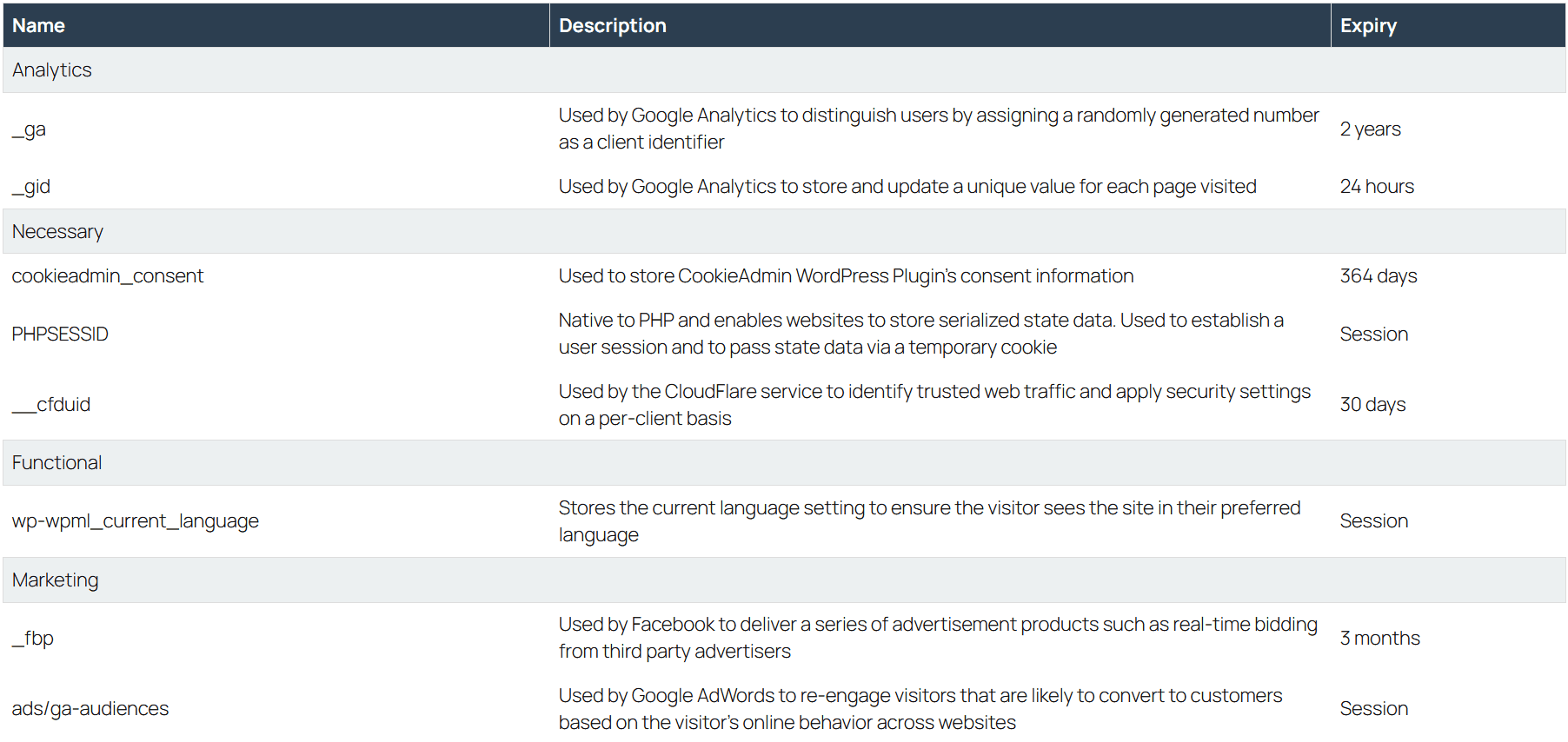
CookieAdmin allows you to display a dynamic, automatically updated cookie table anywhere using a simple Shortcode.
This table pulls cookie data from your CookieAdmin database and groups it by category — making your site more transparent and GDPR-ready.
Shortcode is:
[cookieadmin_render]Usage
By default this will show all the cookie categories.
Insert this Shortcode inside any page, blog to view a structured table showing all cookies scanned by CookieAdmin.
Many businesses use this table for Legal audits, Client transparency, Enterprise compliance documentation and Internal compliance records.
Since the data is generated dynamically, it always reflects the latest scanned cookies.
If
you an agency who manage websites for clients, add this Shortcode to
every client’s cookie policy page to save maintenance time and reduces compliance risk.
The cookie table is typically used on :
1 .Cookie Policy Page (Most Common Use) - for GDPR compliance, ePrivacy Directive requirements, Legal transparency
2. Privacy Policy Page - to help visitors understand what cookies are used, why they are used and how long they last.
Cookie categories
CookieAdmin organizes cookies into five standard compliance categories.
Those categories are :
1. Necessary : Essential cookies required for the website to function properly. To enable core functionality (security, login, forms), maintain session state, store consent preferences and cannot be disabled.
2. Functional : Cookies that remember user settings and enhance experience.
These cookies are used to Store language preferences, Save theme
settings (dark/light mode), Remember region selection, Personalize
content. They improve user experience but are not strictly necessary.
3. Analytical : Cookies used to collect anonymous statistical data
about website usage. These cookies help to Measure visitor traffic,
Analyze user behavior, Improve website performance and Understand
popular content.
4. Marketing : Cookies used for advertising and tracking
across websites. These cookies are used to Track users across different
websites, Build user profiles, Display personalized ads and to Measure
advertising effectiveness.
5. Unknown : Cookies that have been detected but not yet categorized.
This can happen when a new plugin sets cookies, a third-party script
adds cookies or a scan detects unknown storage. You should review and
assign these cookies to the correct category for compliance clarity.
Display specific cookie categories
You can show only specific categories if needed. The below usage of
ShortCode will show Necessary, Analytical and Marketing cookies and skip
the Functional cookies.
Eg : [cookieadmin_render categories="necessary,analytics,marketing"]
Remember to :
1. Use comma-separated category names.
2. Category names matching is case-insensitive.
3. Only cookies from those categories will be displayed.
What Information Is Displayed
The generated table shows grouped by Category :
1. Cookie Name : The technical cookie identifier.
2. Description : Purpose of the cookie (if defined).
3. Expiry : Number of remaining days Or “Session” if it expires on browser close
Best Practice Recommendation
For full compliance:
1. Create a dedicated Cookie Policy page.
2. Add the Shortcode.
3. Link it in your website footer.
4. Reference it inside your Privacy Policy.